
How to Create a Sunset Meadow Fashion Video With AI
Turn one portrait into a dreamy sunset meadow sequence with an olive slip dress, natural hair movement, gentle poses, and a glowing cloud backdrop.
Example image
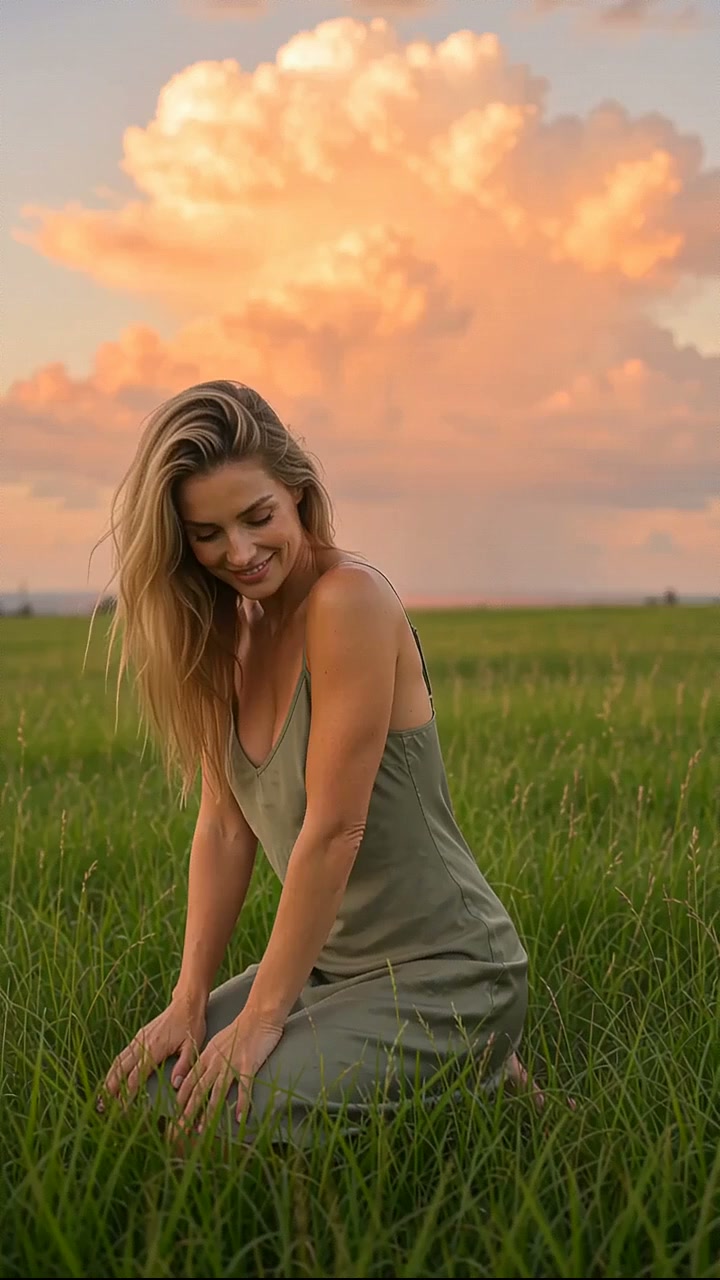
The example image is the first frame of the generated result. The accompanying effect preview uses the finished video from the same generation.
What you need
- One clear photo of one adult woman
- A front-facing or three-quarter face with natural lighting
- Visible facial structure and hair
- No sunglasses, face obstruction, tiny face, or heavy beauty filter
The source photo provides identity only. The effect creates the wardrobe, environment, camera movement, transitions, choreography, lighting, and music.
Step 1: Open the Sunset Meadow Sway effect
Choose Sunset Meadow Sway in AI Video. It is configured for one-person reference-to-video generation in a vertical 9:16 format.
Step 2: Upload the portrait
Upload one portrait of an adult woman. A simple, evenly lit source image usually preserves identity more reliably than a dramatic pose or heavily edited selfie.
Step 3: Generate the video
Start generation and allow the full scene to complete. The effect follows the original source timing after repeated end-loop frames have been removed.
Full English prompt
Create a 9.3-second vertical cinematic fashion video featuring exactly one adult woman, preserving the identity, facial structure, skin tone, hair, and body proportions of the adult woman visible in the reference image. Replace her source clothing with a simple olive-sage spaghetti-strap slip dress that falls naturally around her body. Do not add another person.

Scene and light: a waist-high green meadow at sunset beneath a monumental peach-orange cumulus cloud. Warm coral side light paints her skin and dress while the grass stays fresh green; soft blue-grey sky surrounds the glowing cloud. The mood is dreamy, carefree, intimate, and lightly nostalgic.

Timeline and choreography: 0.0-1.5s, medium shot, she sits or kneels low in the grass in three-quarter profile, looks down with a shy smile, then slowly lifts her chin. 1.5-2.6s, she arches her head back into the warm breeze, shoulders relaxed, hair moving naturally. 2.6-4.2s, she raises both hands behind her head, gently gathers and releases her hair without hand or finger distortion. 4.2-5.3s, she lifts both arms into loose balletic curves above her head and smiles upward. 5.3-6.3s, arms lower as she turns her torso back toward camera, soft eye contact returning. 6.3-7.5s, a clean cut to a closer front-facing shot as she steps and sways through the grass with both arms extended for balance. 7.5-9.2s, a closer push-in as she walks toward camera, hair sweeping sideways, ending on a warm open smile. Finish before any loop or restart.

Camera: mostly locked portrait framing with subtle handheld breathing, then one clean cut and a gentle forward move. Natural 24fps motion, realistic grass and hair physics, shallow depth of field, no speed ramp. Audio: dreamy indie-pop instrumental with soft synth pads, a gentle mid-tempo beat, light wind through grass and distant evening birds; no dialogue or vocals. No text, subtitles, logos, watermark, duplicated body, extra limbs, warped hands, face morphing, flicker, or clothing drift.
Quality checklist
- Exactly one adult woman remains recognizable
- Face, skin tone, hairstyle, age, and body proportions stay stable
- Wardrobe and location changes follow the prompt timeline
- Hands, hair, fabric, bags, shoes, turns, and poses move naturally
- Music matches the scene and contains no dialogue or vocals
- No extra people, duplicate limbs, warped hands, text, subtitles, logos, interface, or watermark
Pro tip
Use a source portrait with clean facial detail and enough resolution. The effect already directs expression and movement, so a neutral input gives the video model more room to reproduce the intended fashion choreography.