
How to Create a Hotel Window Editorial With AI
Create a long-form luxury hotel fashion film with mint floral styling, city-window silhouettes, playful close-ups, and warm late-afternoon light.
Example image
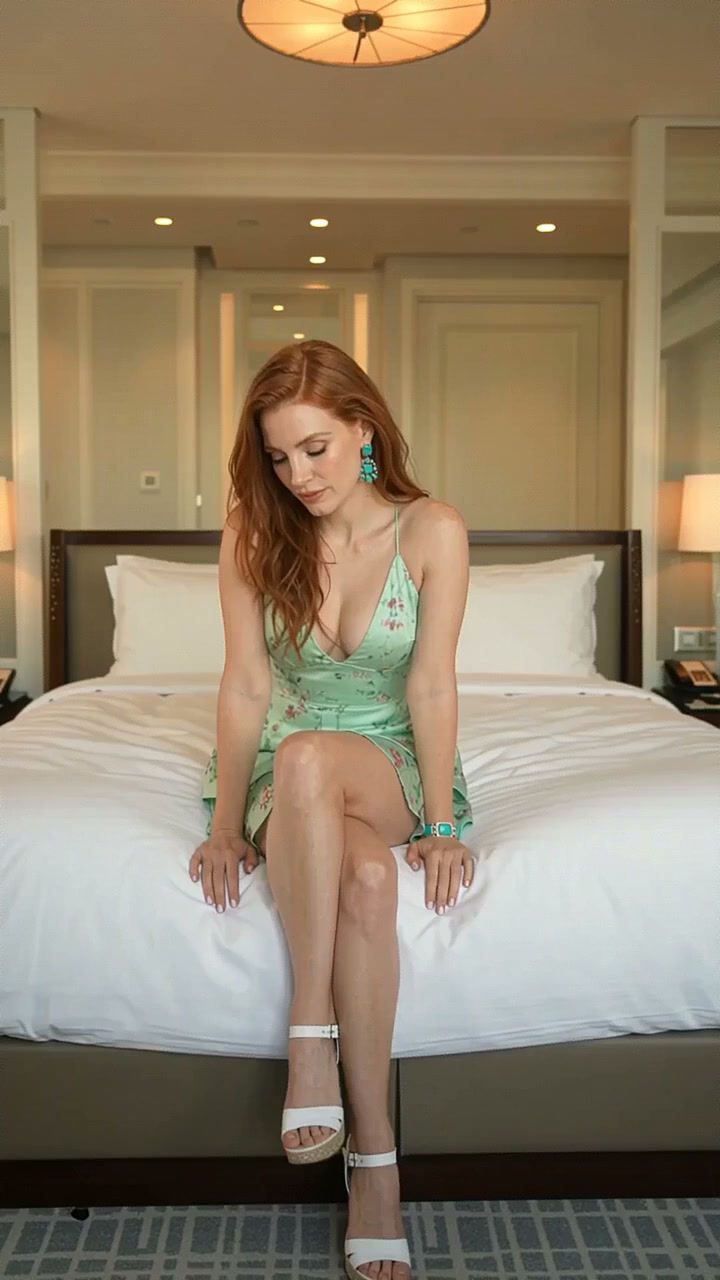
The example image is the first frame of the generated result. The accompanying effect preview uses the finished video from the same generation.
What you need
- One clear photo of one adult woman
- A front-facing or three-quarter face with natural lighting
- Visible facial structure and hair
- No sunglasses, face obstruction, tiny face, or heavy beauty filter
The source photo provides identity only. The effect creates the wardrobe, environment, camera movement, transitions, choreography, lighting, and music.
Step 1: Open the Hotel Window Editorial effect
Choose Hotel Window Editorial in AI Video. It is configured for one-person reference-to-video generation in a vertical 9:16 format.
Step 2: Upload the portrait
Upload one portrait of an adult woman. A simple, evenly lit source image usually preserves identity more reliably than a dramatic pose or heavily edited selfie.
Step 3: Generate the video
Start generation and allow the full scene to complete. The effect follows the original source timing after repeated end-loop frames have been removed.
Full English prompt
Create a 28.0-second vertical luxury hotel fashion film featuring exactly one adult woman, preserving the identity, face, skin tone, hair, and body proportions of the adult woman visible in the reference image. Dress her throughout in a mint-green silk mini dress with thin straps, dark botanical print, fitted waist, soft drape, and matching turquoise statement earrings, bracelet and ring. Do not add another person.

Location and lighting: an elegant high-rise hotel bedroom with white bedding, floor-to-ceiling windows, dark plum curtains, sheer ivory drapes and a distant city skyline. Use warm late-afternoon backlight, soft reflected fill, and occasional silhouette. Mood: polished, intimate, playful, self-assured.

Sequence: 0.0-1.4s seated on the bed, knees folded, looking down then up. 1.4-2.6s side profile by the sheer curtain, one hand near her collarbone. 2.6-3.9s front seated portrait, subtle smile. 3.9-5.2s dark silhouette sitting in the open window recess, city behind her. 5.2-6.6s close seated three-quarter pose, one shoulder turned toward camera. 6.6-7.9s over-shoulder close-up with direct eye contact. 7.9-9.3s front portrait as hair falls loosely across one eye. 9.3-10.4s return to the curtain side profile. 10.4-12.9s wider window-recess silhouette; she shifts her legs and looks across the skyline. 12.9-14.9s close-up as she gathers her hair into a loose updo, jewelry catching the sun. 14.9-16.5s standing medium portrait, head turning slowly toward camera. 16.5-18.8s she leans forward across the bed, playful confident eye contact. 18.8-19.9s energetic reach toward the lens creates a soft hand-wipe transition, then she drops onto the bed laughing silently. 19.9-21.5s intimate close-up, hands loosely gathered beneath her chin. 21.5-23.5s full-body by the sheer curtains, relaxed sway and bright smile. 23.5-24.7s she turns away and traces the curtain with her fingertips. 24.7-26.0s window-recess silhouette again, one hand against the glass. 26.0-27.9s warm close-up with skyline bokeh; she turns her face from camera toward the city. End before the opening bed pose repeats.

Camera: clean editorial hard cuts, controlled phone-camera intimacy, occasional slow push-in, no frantic movement. Maintain realistic bed compression, jewelry, hands, hair and dress physics. Audio: luxury downtempo instrumental with warm electric piano, brushed percussion, soft bass and faint room ambience; no dialogue or vocals. No text, logos, watermark, extra people, face morphing, extra limbs, warped hands, flicker, or wardrobe inconsistency.
Quality checklist
- Exactly one adult woman remains recognizable
- Face, skin tone, hairstyle, age, and body proportions stay stable
- Wardrobe and location changes follow the prompt timeline
- Hands, hair, fabric, bags, shoes, turns, and poses move naturally
- Music matches the scene and contains no dialogue or vocals
- No extra people, duplicate limbs, warped hands, text, subtitles, logos, interface, or watermark
Pro tip
Use a source portrait with clean facial detail and enough resolution. The effect already directs expression and movement, so a neutral input gives the video model more room to reproduce the intended fashion choreography.