
Storybook Realism: 1 Photo Style and Its Prompt
Keep a photographic face and realistic detail while shifting the scene toward warm lifestyle-editorial light. This is the subtle option in the Cartoon collection, with atmosphere doing more of the work than drawn outlines.
Make your look in Vidream
- Open Cartoon and choose Storybook Realism.
- Browse the examples below and select the filter with the matching name.
- Upload a clear photo with the face and main subject fully visible.
- Generate your image, then check the face, hands, outfit and background before saving it.
Choose your photo: A sharp lifestyle portrait with natural light, readable skin detail and some distance between the subject and background.
How to use the prompts
Each prompt below is a self-contained recipe for one uploaded photo plus written style instructions. Use it in an image-editing tool that accepts a photo and a text prompt. No second style image is needed. In Vidream, choosing the named filter uses its preset treatment.
The gallery shows the current Vidream filter examples in a 3:4 display crop. The written recipes describe those looks; a new generation can vary in fine detail and likeness.
All 1 look
1. Warm Lifestyle Magazine Figure
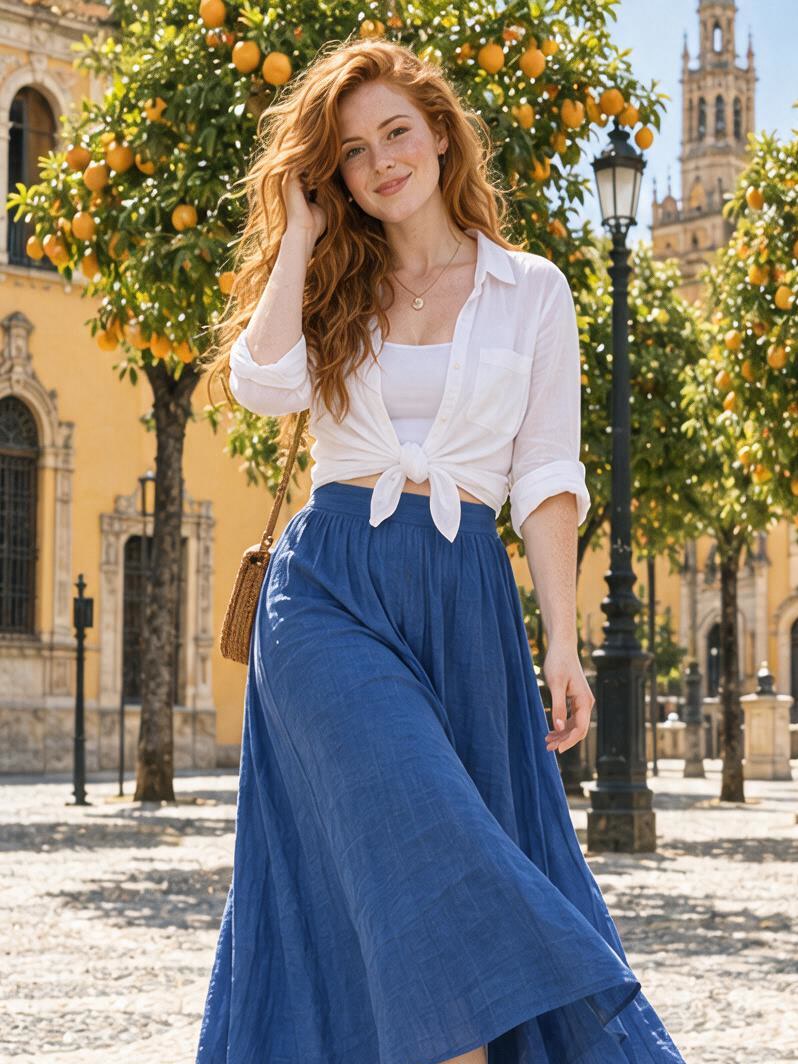
Look for: Warm natural photographic light, realistic detail and softly defocused distances, balanced luminous color, subtle film grain and fully retained photographic facial features.
Copy this prompt:
Edit the uploaded photo using this photographic treatment: Warm natural photographic light, realistic detail and softly defocused distances, balanced luminous color, subtle film grain and fully retained photographic facial features.

Keep the original people, facial identity, age, skin-tone relationships, hairstyle, pose, clothing, objects and setting. Translate the same facial features into this treatment while retaining their proportions and emotional intent. If the photo has no people, apply the treatment to its existing scene and objects.

Apply the described look consistently across the subject and background. Preserve the main spatial relationships and keep the face and important details fully visible in a single 3:4 vertical composition. Do not add people, props, text, logos, watermarks or panels.
Refine the result
Preserve natural facial structure and texture. Adjust warmth, highlight softness and background separation before increasing stylization.
Strong black outlines, exaggerated cartoon eyes or plastic skin would move the image away from this particular look.
Keep the same source photo when comparing recipes. Change one style instruction at a time so you can see what actually changed.